Sharing

顯示具有 Network 標籤的文章。 顯示所有文章

2013年2月17日 星期日

iptables 設定筆記


基本的操作可以參考鳥哥的文章

http://linux.vbird.org/linux_server/0250simple_firewall.php

列出某一個 Table 的 Rule
root@ubuntu:~$ iptables -t nat -L -n                                                            
Chain PREROUTING (policy ACCEPT)
target     prot opt source               destination

Chain INPUT (policy ACCEPT)
target     prot opt source               destination

Chain OUTPUT (policy ACCEPT)
target     prot opt source               destination

Chain POSTROUTING (policy ACCEPT)
target     prot opt source               destination
MASQUERADE  tcp  --  192.168.228.0/22    !192.168.228.0/22     masq ports: 1024-65535
MASQUERADE  udp  --  192.168.228.0/22    !192.168.228.0/22     masq ports: 1024-65535
MASQUERADE  all  --  192.168.228.0/22    !192.168.228.0/22
SNAT       all  --  0.0.0.0/0            0.0.0.0/0            source IP range 192.168.229.1-192.168.231.254 destination
IP range 172.18.203.1-172.18.203.250 to:172.18.203.254
MASQUERADE  all  --  0.0.0.0/0            0.0.0.0/0            PHYSDEV match --physdev-in eth1
MASQUERADE  all  --  0.0.0.0/0            0.0.0.0/0            PHYSDEV match --physdev-in eth2
MASQUERADE  all  --  0.0.0.0/0            0.0.0.0/0            PHYSDEV match --physdev-in eth3
MASQUERADE  all  --  0.0.0.0/0            0.0.0.0/0            PHYSDEV match --physdev-in tap0
MASQUERADE  all  --  0.0.0.0/0            0.0.0.0/0            PHYSDEV match --physdev-in tap1
MASQUERADE  all  --  0.0.0.0/0            0.0.0.0/0            PHYSDEV match --physdev-in tap2
MASQUERADE  all  --  0.0.0.0/0            0.0.0.0/0            PHYSDEV match --physdev-in tap3
MASQUERADE  all  --  0.0.0.0/0            0.0.0.0/0            PHYSDEV match --physdev-in tap4
MASQUERADE  all  --  0.0.0.0/0            0.0.0.0/0            PHYSDEV match --physdev-in tap5
MASQUERADE  all  --  0.0.0.0/0            0.0.0.0/0            PHYSDEV match --physdev-in tap6
MASQUERADE  all  --  0.0.0.0/0            0.0.0.0/0            PHYSDEV match --physdev-in tap7
MASQUERADE  all  --  0.0.0.0/0            0.0.0.0/0            PHYSDEV match --physdev-in tap8
MASQUERADE  all  --  0.0.0.0/0            0.0.0.0/0            PHYSDEV match --physdev-in tap9
MASQUERADE  all  --  0.0.0.0/0            0.0.0.0/0            PHYSDEV match --physdev-in vnet0
MASQUERADE  all  --  0.0.0.0/0            0.0.0.0/0            PHYSDEV match --physdev-in vnet1

列出某一個 Table 的 Rule 並且加上編號, 這個編號在刪除 rule 時會用到
root@ubuntu:~$ iptables -t nat -nL --line-numbers          
Chain PREROUTING (policy ACCEPT)
num  target     prot opt source               destination

Chain INPUT (policy ACCEPT)
num  target     prot opt source               destination

Chain OUTPUT (policy ACCEPT)
num  target     prot opt source               destination

Chain POSTROUTING (policy ACCEPT)
num  target     prot opt source               destination
1    MASQUERADE  tcp  --  192.168.228.0/22    !192.168.228.0/22     masq ports: 1024-65535
2    MASQUERADE  udp  --  192.168.228.0/22    !192.168.228.0/22     masq ports: 1024-65535
3    MASQUERADE  all  --  192.168.228.0/22    !192.168.228.0/22
4    SNAT       all  --  0.0.0.0/0            0.0.0.0/0            source IP range 192.168.229.1-192.168.231.254 destina
tion IP range 172.18.203.1-172.18.203.250 to:172.18.203.254
5    MASQUERADE  all  --  0.0.0.0/0            0.0.0.0/0            PHYSDEV match --physdev-in eth1
6    MASQUERADE  all  --  0.0.0.0/0            0.0.0.0/0            PHYSDEV match --physdev-in eth2
7    MASQUERADE  all  --  0.0.0.0/0            0.0.0.0/0            PHYSDEV match --physdev-in eth3
8    MASQUERADE  all  --  0.0.0.0/0            0.0.0.0/0            PHYSDEV match --physdev-in tap0
9    MASQUERADE  all  --  0.0.0.0/0            0.0.0.0/0            PHYSDEV match --physdev-in tap1
10   MASQUERADE  all  --  0.0.0.0/0            0.0.0.0/0            PHYSDEV match --physdev-in tap2
11   MASQUERADE  all  --  0.0.0.0/0            0.0.0.0/0            PHYSDEV match --physdev-in tap3
12   MASQUERADE  all  --  0.0.0.0/0            0.0.0.0/0            PHYSDEV match --physdev-in tap4
13   MASQUERADE  all  --  0.0.0.0/0            0.0.0.0/0            PHYSDEV match --physdev-in tap5
14   MASQUERADE  all  --  0.0.0.0/0            0.0.0.0/0            PHYSDEV match --physdev-in tap6
15   MASQUERADE  all  --  0.0.0.0/0            0.0.0.0/0            PHYSDEV match --physdev-in tap7
16   MASQUERADE  all  --  0.0.0.0/0            0.0.0.0/0            PHYSDEV match --physdev-in tap8
17   MASQUERADE  all  --  0.0.0.0/0            0.0.0.0/0            PHYSDEV match --physdev-in tap9
18   MASQUERADE  all  --  0.0.0.0/0            0.0.0.0/0            PHYSDEV match --physdev-in vnet0
19   MASQUERADE  all  --  0.0.0.0/0            0.0.0.0/0            PHYSDEV match --physdev-in vnet1


列出某一個 table 的 rule 指令
root@ubuntu:~$ iptables-save -t nat
# Generated by iptables-save v1.4.12 on Mon Feb 18 14:43:37 2013
*nat
:PREROUTING ACCEPT [17013:1897631]
:INPUT ACCEPT [12931:1479517]
:OUTPUT ACCEPT [7294:518260]
:POSTROUTING ACCEPT [7677:530072]
-A POSTROUTING -s 192.168.228.0/22 ! -d 192.168.228.0/22 -o eth2 -p tcp -j MASQUERADE --to-ports 1024-65535
-A POSTROUTING -s 192.168.228.0/22 ! -d 192.168.228.0/22 -o eth2 -p udp -j MASQUERADE --to-ports 1024-65535
-A POSTROUTING -s 192.168.228.0/22 ! -d 192.168.228.0/22 -o eth2 -j MASQUERADE
-A POSTROUTING -m iprange --src-range 192.168.229.1-192.168.231.254 --dst-range 172.18.203.1-172.18.203.250 -j SNAT --to-source 172.18.203.254
-A POSTROUTING -o eth0 -m physdev --physdev-in eth1 -j MASQUERADE
-A POSTROUTING -o eth0 -m physdev --physdev-in eth2 -j MASQUERADE
-A POSTROUTING -o eth0 -m physdev --physdev-in eth3 -j MASQUERADE
-A POSTROUTING -o eth0 -m physdev --physdev-in tap0 -j MASQUERADE
-A POSTROUTING -o eth0 -m physdev --physdev-in tap1 -j MASQUERADE
-A POSTROUTING -o eth0 -m physdev --physdev-in tap2 -j MASQUERADE
-A POSTROUTING -o eth0 -m physdev --physdev-in tap3 -j MASQUERADE
-A POSTROUTING -o eth0 -m physdev --physdev-in tap4 -j MASQUERADE
-A POSTROUTING -o eth0 -m physdev --physdev-in tap5 -j MASQUERADE
-A POSTROUTING -o eth0 -m physdev --physdev-in tap6 -j MASQUERADE
-A POSTROUTING -o eth0 -m physdev --physdev-in tap7 -j MASQUERADE
-A POSTROUTING -o eth0 -m physdev --physdev-in tap8 -j MASQUERADE
-A POSTROUTING -o eth0 -m physdev --physdev-in tap9 -j MASQUERADE
-A POSTROUTING -o eth0 -m physdev --physdev-in vnet0 -j MASQUERADE
-A POSTROUTING -o eth0 -m physdev --physdev-in vnet1 -j MASQUERADE
COMMIT
# Completed on Mon Feb 18 14:43:37 2013

刪除某個 chain 的第 n 條 rule
root@ubuntu:~$ iptables -t nat -D POSTROUTING 4

2012年7月29日 星期日

monitor network traffic -- iftop/nethogs


之前有使用過 ntop 這套工具, 它的缺點就是 loading 比較重, 需要額外安裝 apache, 不過好處是網路的流量圖表做的很好, 所以要給老闆看美麗的報表時, 可以使用它.


但如果只是想要馬上看看網路狀況, 做一些環境的檢測時, 那我覺得下面這篇文章內介紹的兩個工具應該會派上用場.
http://techthrob.com/2010/07/26/how-to-monitor-network-traffic-in-linux/

這篇主要是介紹兩個可以觀察網路流量的工具 iftop/nethogs. 安裝上很簡單, 而且可以立即使用, 應該是不需要任何的教學 :)

pjack@ubuntu:~$ sudo apt-get install iftop
pjack@ubuntu:~$ sudo apt-get install nethogs
pjack@ubuntu:~$ sudo iftop -i eth0
pjack@ubuntu:~$ sudo nethogs eth0


2012年5月19日 星期六

VPN


最喜歡的解釋是這段, 沒有資訊背景的人也聽的懂

以日常生活的例子來比喻,虛擬私人網路就像:甲公司某部門的A想寄信去乙公司某部門的B。A已知B的地址及部門,但公司與公司之間的信不能註明部門名稱。於是,A請自己的秘書把指定B所屬部門的信(A可以選擇是否以密碼與B通訊)放在寄去乙公司地址的大信封中。當乙公司的秘書收到從甲公司寄到乙公司的信件後,該秘書便會把放在該大信封內的指定部門信件以公司內部郵件方式寄給B。同樣地,B會以同樣的方式回信給A。

VPN 設定
http://sofree.cc/vpn/
http://icc.web.ym.edu.tw/ezcatfiles/b032/img/img/856/VPN_Win7.pdf

如果遇到無法連線成功, 有可能是使用 L2TP 連線, window7 預設不開啟, 那可以 Smart VPN Client 來幫你開啟, 開啟後需要重新開機
http://www.draytek.com/user/SupportDLUtility.php

另外 L2TP 如果是使用預設金鑰的模式, 可以參考這篇設定
http://www.hideipvpn.com/2010/03/howto-windows-7-ipsecl2tp-vpn-setup-tutorial/


這是連線前的 routing table
===========================================================================
介面清單
 10...1c 6f 65 21 74 2b ......Realtek PCIe GBE Family Controller
 19...00 50 56 c0 00 01 ......VMware Virtual Ethernet Adapter for VMnet1
 20...00 50 56 c0 00 08 ......VMware Virtual Ethernet Adapter for VMnet8
  1...........................Software Loopback Interface 1
 17...00 00 00 00 00 00 00 e0 Microsoft ISATAP Adapter
 11...00 00 00 00 00 00 00 e0 Teredo Tunneling Pseudo-Interface
 18...00 00 00 00 00 00 00 e0 Microsoft ISATAP Adapter #2
 21...00 00 00 00 00 00 00 e0 Microsoft ISATAP Adapter #3
 29...00 00 00 00 00 00 00 e0 Microsoft ISATAP Adapter #4
===========================================================================

IPv4 路由表
===========================================================================
使用中的路由:
網路目的地                 網路遮罩         閘道          介面       計量
          0.0.0.0          0.0.0.0      192.168.1.1      192.168.1.2     20
        127.0.0.0        255.0.0.0            在連結上         127.0.0.1    306
        127.0.0.1  255.255.255.255            在連結上         127.0.0.1    306
  127.255.255.255  255.255.255.255            在連結上         127.0.0.1    306
      192.168.1.0    255.255.255.0            在連結上       192.168.1.2    276
      192.168.1.2  255.255.255.255            在連結上       192.168.1.2    276
    192.168.1.255  255.255.255.255            在連結上       192.168.1.2    276
     192.168.65.0    255.255.255.0            在連結上      192.168.65.1    276
     192.168.65.1  255.255.255.255            在連結上      192.168.65.1    276
   192.168.65.255  255.255.255.255            在連結上      192.168.65.1    276

D:\>tracert  -d www.google.com

在上限 30 個躍點上
追蹤 www.l.google.com [74.125.31.103] 的路由:

  1    <1 ms    <1 ms    <1 ms  192.168.1.1
  2    16 ms    17 ms    17 ms  168.95.98.254
  3     *       16 ms    16 ms  168.95.85.42
  4    18 ms    18 ms    19 ms  211.22.226.1
  5    18 ms    18 ms    18 ms  209.85.243.26
  6    38 ms    18 ms    18 ms  209.85.250.103
  8    28 ms    40 ms    32 ms  209.85.241.166
  9    28 ms    31 ms    32 ms  72.14.203.103
這是連線後的 routing table, 可以發現多了一個 VPN 介面 (172.16.1.102) routing table 也預設都從這個新介面出去 (0.0.0.0 => 172.16.1.102) 連結 VPN Server (60.251.132.28) 則設定成從原來的閘道 192.168.1.1 出去
===========================================================================
介面清單
 28...........................VPN 連線
 10...1c 6f 65 21 74 2b ......Realtek PCIe GBE Family Controller
 19...00 50 56 c0 00 01 ......VMware Virtual Ethernet Adapter for VMnet1
 20...00 50 56 c0 00 08 ......VMware Virtual Ethernet Adapter for VMnet8
  1...........................Software Loopback Interface 1
 17...00 00 00 00 00 00 00 e0 Microsoft ISATAP Adapter
 11...00 00 00 00 00 00 00 e0 Teredo Tunneling Pseudo-Interface
 18...00 00 00 00 00 00 00 e0 Microsoft ISATAP Adapter #2
 21...00 00 00 00 00 00 00 e0 Microsoft ISATAP Adapter #3
 29...00 00 00 00 00 00 00 e0 Microsoft ISATAP Adapter #4
===========================================================================

IPv4 路由表
===========================================================================
使用中的路由:
網路目的地                 網路遮罩         閘道          介面       計量
          0.0.0.0          0.0.0.0      192.168.1.1      192.168.1.2   4245
          0.0.0.0          0.0.0.0            在連結上      172.16.1.102     21
    60.251.132.28  255.255.255.255      192.168.1.1      192.168.1.2   4246
        127.0.0.0        255.0.0.0            在連結上         127.0.0.1   4531
        127.0.0.1  255.255.255.255            在連結上         127.0.0.1   4531
  127.255.255.255  255.255.255.255            在連結上         127.0.0.1   4531
     172.16.1.102  255.255.255.255            在連結上      172.16.1.102    276
      192.168.1.0    255.255.255.0            在連結上       192.168.1.2   4501
      192.168.1.2  255.255.255.255            在連結上       192.168.1.2   4501
    192.168.1.255  255.255.255.255            在連結上       192.168.1.2   4501
     192.168.65.0    255.255.255.0            在連結上      192.168.65.1   4501
     192.168.65.1  255.255.255.255            在連結上      192.168.65.1   4501
   192.168.65.255  255.255.255.255            在連結上      192.168.65.1   4501

D:\>ipconfig

Windows IP 設定

PPP 介面卡 VPN 連線:

   連線特定 DNS 尾碼 . . . . . . . . :
   IPv4 位址 . . . . . . . . . . . . : 172.16.1.102
   子網路遮罩 . . . . . . . . . . . .: 255.255.255.255
   預設閘道 . . . . . . . . . . . . .: 0.0.0.0

D:\>tracert  -d www.google.com

在上限 30 個躍點上
追蹤 www.l.google.com [72.14.203.103] 的路由:

  1    23 ms    23 ms    23 ms  172.16.1.3
  2    25 ms    23 ms    23 ms  10.8.0.1
  3    34 ms    32 ms    32 ms  60.251.132.254
  4    28 ms    31 ms    40 ms  168.95.211.74
  5    34 ms    32 ms    31 ms  211.22.226.1
  6    34 ms    31 ms    32 ms  209.85.243.26
  7    33 ms    32 ms    31 ms  209.85.250.103
  8    28 ms    40 ms    32 ms  209.85.241.166
  9    28 ms    31 ms    32 ms  72.14.203.103

D:\>tracert  -d 60.251.132.28

在上限 30 個躍點上追蹤 60.251.132.28 的路由

  1    <1 ms    <1 ms    <1 ms  192.168.1.1
  2    26 ms    17 ms    37 ms  168.95.98.254
  3     *        *       16 ms  168.95.85.42
  4    17 ms    19 ms    17 ms  168.95.209.73
  5    19 ms    23 ms    24 ms  60.251.132.28
  6    27 ms    24 ms    24 ms  60.251.132.28

不過其實 tracert 出來的結果讓我有點意外, 或者說和我猜的不一樣, 原以為他應該要透過 192.168.1.1 先連到 60.251.132.28, 再連到 172.16.1.102, 最後再連到 google.com

但結果卻沒有顯示連到 172.16.1.102 這段, 我想是因為 VPN 是架在 Layer 2 的服務, 送到 172.16.1.3 的封包, 應該都會被 VPN Client 轉包過, 然後送到 VPN Server, 所以 ping 這個服務並不知道自己送的東西曾經被轉包過, 也自然無法顯示出這段路徑

Reference:
http://zh.wikipedia.org/wiki/%E8%99%9B%E6%93%AC%E7%A7%81%E4%BA%BA%E7%B6%B2%E8%B7%AF

http://avp.toko.edu.tw/docs/class/3/VPN%20%E8%99%9B%E6%93%AC%E7%A7%81%E6%9C%89%E7%B6%B2%E8%B7%AF%E6%8A%80%E8%A1%93%E6%A6%82%E8%AA%AA(%E7%AA%84%E9%A0%BB).pdf http://life.different.idv.tw/scottwu/37.htm

http://www.cc.ntu.edu.tw/chinese/epaper/20070620_1004.htm

http://technet.microsoft.com/zh-tw/library/cc737500(v=ws.10).aspx

OSI Layer 7

想不到這年紀也需要復習一下是那七層..


OSI Model
Data unitLayerFunction
Host
layers
Data7. ApplicationNetwork process to application
6. PresentationData representation, encryption and decryption, convert machine dependent data to machine independent data
5. SessionInterhost communication, managing sessions between applications
Segments4. TransportEnd-to-end connections, reliability and flow control
Media
layers
Packet/Datagram3. NetworkPath determination and logical addressing
Frame2. Data linkPhysical addressing
Bit1. PhysicalMedia, signal and binary transmission


7
Application
 DNSFTPHTTP, NFS, DHCP, SMTP, Telnet
6
Presentation
5
Session
Sockets. Session establishment inTCPRTP
4
Transport
3
Network
2
Data Link
1
Physical


Reference:
http://htnvt241.blog.ithome.com.tw/post/2589/35507
http://linux-dindin.blogspot.com/2009/08/iso-osi.html
http://linux.vbird.org/linux_server/0110network_basic.php#whatisnetwork_osi
http://en.wikipedia.org/wiki/OSI_model
http://en.wikipedia.org/wiki/TCP/IP_model

2012年3月20日 星期二

Network reverse-path filter


今天在公司遇到了一件很怪的事, 狀況是這樣子的
從 C 機器可以 ping 的到 A, 但 A 就是無法 ping 回 C
而且和 C 機器在同一個網段的機器 D 就沒這個問題
仔細請教公司的網路大師後, 才找到為什麼

網路架構如下

172.16.x.x ──── 172.16.x.x
    A                B
    │           192.168.x.x ────── 192.168.x.x
    │                                   C
    │                              172.16.x.x
    │                                   │
    └───────────────────────────────────┘

有三台機器
A eth0 172.16.x.x
B eth0 172.16.x.x
    eth1 192.168.x.x
C eth0 192.168.x.x
    eth1 172.16.x.x

原因就出在第三台機器為了方便, 所以在 eth1 多接了一條網路到直接通到 172.16.x.x 的網段, 從 172.16.x.x ping 192.168.x.x 時, 走的是上面的的路線, 而當 C 要回應時, 則因為有更適合的路, 所以要走下面那段路

但在一些安全性考量之下, 這樣的行為是被擋掉的, 回去的路必須要跟來的路相同, 如果要接受這樣的行為, 則必須要把 reverse-path filter 關掉

pjack@ubuntu:~$ cat /etc/sysctl.conf | grep filter 
# Uncomment the next two lines to enable Spoof protection (reverse-path filter) 
# net.ipv4.conf.default.rp_filter=1 
# 改設成 0 
net.ipv4.conf.default.rp_filter=0 
# net.ipv4.conf.all.rp_filter=1 
# 改設成 0 
net.ipv4.conf.all.rp_filter=0 
 
pjack@ubuntu:~$ sudo sysctl -p 
net.ipv4.conf.default.rp_filter=0 
net.ipv4.conf.all.rp_filter=0  

pjack@ubuntu:~$ sysctl -a | grep rp_filter 
net.ipv4.conf.all.rp_filter = 0 
net.ipv4.conf.all.arp_filter = 0 
net.ipv4.conf.default.rp_filter = 0 
net.ipv4.conf.default.arp_filter = 0 
net.ipv4.conf.br1.rp_filter = 0 
net.ipv4.conf.br1.arp_filter = 0 
net.ipv4.conf.br0.rp_filter = 0 
net.ipv4.conf.br0.arp_filter = 0  

pjack@ubuntu:~$ sudo /etc/init.d/networking restart  


重新設定後果然就通了, 利用 tcpdump 來看封包

# 先看 eth0 進來的封包, 有看到 ICMP  
wistor@wistor-001:~$ sudo tcpdump -i eth0 -n icmp 
tcpdump: WARNING: eth0: no IPv4 address assigned
tcpdump: verbose output suppressed, use -v or -vv for full protocol decode
listening on eth0, link-type EN10MB (Ethernet), capture size 65535 bytes
11:22:11.379560 IP 172.16.123.1 > 192.168.200.83: ICMP echo request, id 1, seq 334, length 40
11:22:16.006429 IP 172.16.123.1 > 192.168.200.83: ICMP echo request, id 1, seq 335, length 40
11:22:20.507438 IP 172.16.123.1 > 192.168.200.83: ICMP echo request, id 1, seq 336, length 40

# 也看看 eth1 出去的封包, 有看到 ICMP
wistor@wistor-001:~$ sudo tcpdump -i eth1 -n icmp
tcpdump: WARNING: eth1: no IPv4 address assigned
tcpdump: verbose output suppressed, use -v or -vv for full protocol decode
listening on eth1, link-type EN10MB (Ethernet), capture size 65535 bytes
11:41:33.586354 IP 192.168.200.83 > 172.16.123.1: ICMP echo reply, id 1, seq 573, length 40
11:41:34.589350 IP 192.168.200.83 > 172.16.123.1: ICMP echo reply, id 1, seq 574, length 40
11:41:35.592638 IP 192.168.200.83 > 172.16.123.1: ICMP echo reply, id 1, seq 575, length 40
11:41:36.596761 IP 192.168.200.83 > 172.16.123.1: ICMP echo reply, id 1, seq 576, length 40

tcpdump 使用 example
http://www.rationallyparanoid.com/articles/tcpdump.html

2012年2月14日 星期二

網路流量監控 ntop


在 Ubuntu 上安裝 ntop 很方便, 只要透過 apt-get 即可, 中間會要求你輸入 admin 的密碼

wistor@wistor-003:~$ sudo apt-get install ntop
[sudo] password for wistor:
Reading package lists... Done
Building dependency tree
Reading state information... Done
The following extra packages will be installed:
  javascript-common libdbi1 libjs-mochikit librrd4 ntop-data python-mako python-markupsafe ttf-dejavu ttf-dejavu-extra
  wwwconfig-common
Suggested packages:
  graphviz gsfonts geoip-database-contrib python-beaker python-mako-doc mysql-client postgresql-client apache2
The following NEW packages will be installed:
  javascript-common libdbi1 libjs-mochikit librrd4 ntop ntop-data python-mako python-markupsafe ttf-dejavu
  ttf-dejavu-extra wwwconfig-common
0 upgraded, 11 newly installed, 0 to remove and 1 not upgraded.
Need to get 5,864 kB of archives.
After this operation, 16.8 MB of additional disk space will be used.
Do you want to continue [Y/n]? y
Get:1 http://tw.archive.ubuntu.com/ubuntu/ oneiric/universe wwwconfig-common all 0.2.2 [18.0 kB]
Get:2 http://tw.archive.ubuntu.com/ubuntu/ oneiric/universe javascript-common all 8 [4,208 B]
Get:3 http://tw.archive.ubuntu.com/ubuntu/ oneiric/main libdbi1 amd64 0.8.4-5.1 [28.5 kB]
Get:4 http://tw.archive.ubuntu.com/ubuntu/ oneiric/universe libjs-mochikit all 1.4.2-3fakesync1 [376 kB]
...
Fetched 5,864 kB in 2s (2,346 kB/s)
Preconfiguring packages ...
Selecting previously deselected package wwwconfig-common.
(Reading database ... 64249 files and directories currently installed.)
Unpacking wwwconfig-common (from .../wwwconfig-common_0.2.2_all.deb) ...
Selecting previously deselected package javascript-common.
Unpacking javascript-common (from .../javascript-common_8_all.deb) ...
Selecting previously deselected package libdbi1.
Unpacking libdbi1 (from .../libdbi1_0.8.4-5.1_amd64.deb) ...
Selecting previously deselected package libjs-mochikit.
Unpacking libjs-mochikit (from .../libjs-mochikit_1.4.2-3fakesync1_all.deb) ...
Selecting previously deselected package librrd4.
Unpacking librrd4 (from .../librrd4_1.4.3-3.1ubuntu2_amd64.deb) ...
Selecting previously deselected package ntop-data.
Unpacking ntop-data (from .../ntop-data_3%3a4.0.3+dfsg1-3build1_all.deb) ...
Selecting previously deselected package python-markupsafe.
Unpacking python-markupsafe (from .../python-markupsafe_0.12-2build1_amd64.deb) ...
Selecting previously deselected package python-mako.
Unpacking python-mako (from .../python-mako_0.4.1-2_all.deb) ...
Selecting previously deselected package ntop.
Unpacking ntop (from .../ntop_3%3a4.0.3+dfsg1-3build1_amd64.deb) ...
Selecting previously deselected package ttf-dejavu-extra.
Unpacking ttf-dejavu-extra (from .../ttf-dejavu-extra_2.33-1ubuntu1_amd64.deb) ...
Selecting previously deselected package ttf-dejavu.
Unpacking ttf-dejavu (from .../ttf-dejavu_2.33-1ubuntu1_amd64.deb) ...
Processing triggers for man-db ...
Processing triggers for ureadahead ...
ureadahead will be reprofiled on next reboot
Processing triggers for fontconfig ...
Setting up wwwconfig-common (0.2.2) ...
Setting up javascript-common (8) ...
Setting up libdbi1 (0.8.4-5.1) ...
Setting up libjs-mochikit (1.4.2-3fakesync1) ...
Setting up librrd4 (1.4.3-3.1ubuntu2) ...
Setting up ntop-data (3:4.0.3+dfsg1-3build1) ...
Setting up python-markupsafe (0.12-2build1) ...
Setting up python-mako (0.4.1-2) ...
Setting up ntop (3:4.0.3+dfsg1-3build1) ...
Adding system user: ntop.
Warning: The home dir /var/lib/ntop you specified already exists.
Adding system user `ntop' (UID 106) ...
Adding new group `ntop' (GID 114) ...
Adding new user `ntop' (UID 106) with group `ntop' ...
The home directory `/var/lib/ntop' already exists.  Not copying from `/etc/skel'.
adduser: Warning: The home directory `/var/lib/ntop' does not belong to the user you are currently creating.
Wed Feb 15 14:31:59 2012  NOTE: Interface merge enabled by default
Wed Feb 15 14:31:59 2012  Initializing gdbm databases
Wed Feb 15 14:31:59 2012  Setting administrator password...
Wed Feb 15 14:31:59 2012  Admin user password has been set
Wed Feb 15 14:31:59 2012  Admin password set...
Starting network top daemon: Wed Feb 15 14:32:00 2012  NOTE: Interface merge enabled by default
Wed Feb 15 14:32:00 2012  Initializing gdbm databases
ntop
Setting up ttf-dejavu-extra (2.33-1ubuntu1) ...
Setting up ttf-dejavu (2.33-1ubuntu1) ...
Processing triggers for libc-bin ...
ldconfig deferred processing now taking place


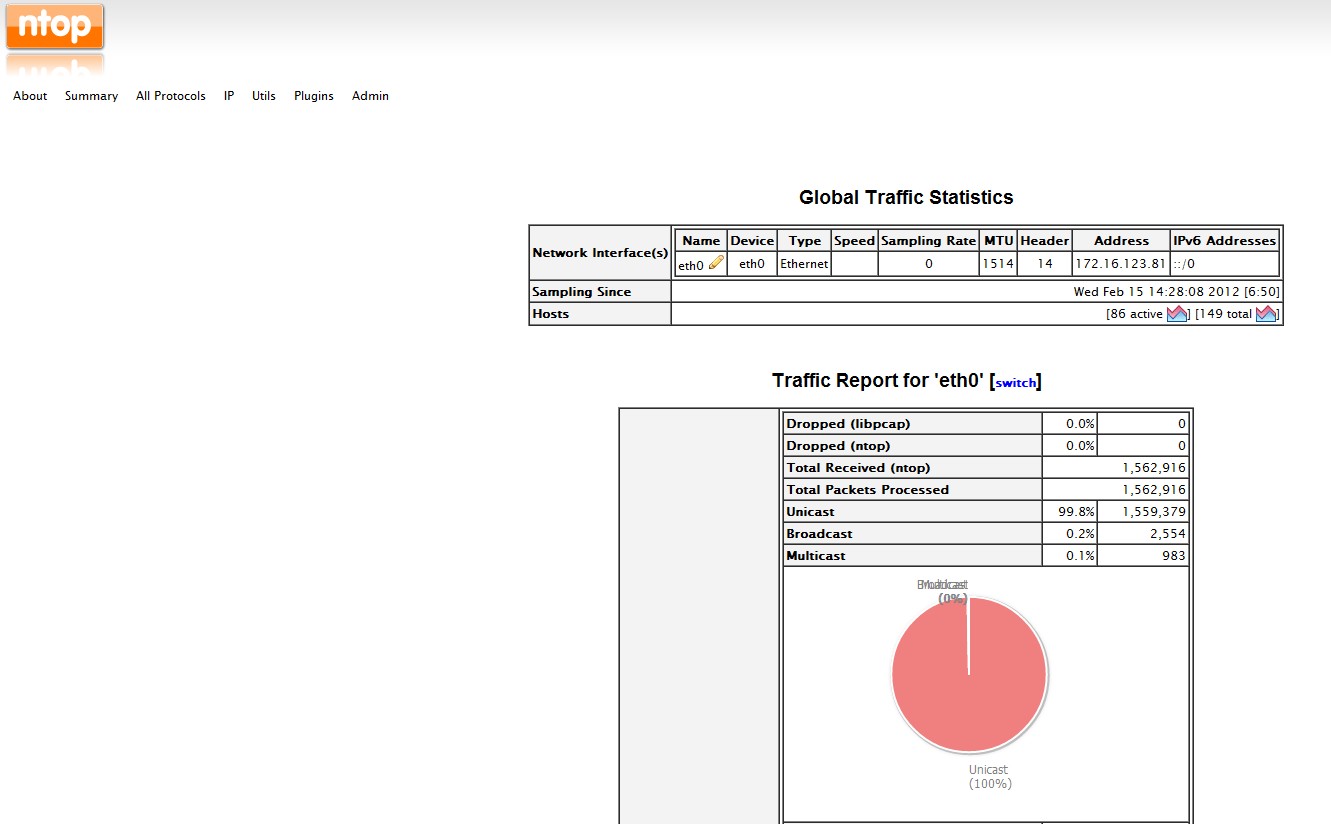
安裝好之後, 預設 port number 是 3000, 所以連到 http://:3000 就可以看到結果


不過馬上就發現怎麼預設是只有 eth0 而已, 如果想要轉換不同的 NIC , 必須修改一下設定檔 /var/lib/ntop/init.cfg

root@wistor-007:/var/lib/ntop$ cat /var/lib/ntop/init.cfg
USER="ntop"
INTERFACES="eth0,eth1"

root@wistor-006:~$ sudo /etc/init.d/ntop restart
Stopping network top daemon: ntop
Starting network top daemon: Wed Feb 15 14:39:35 2012  NOTE: Interface merge enabled by default
Wed Feb 15 14:39:35 2012  Initializing gdbm databases
ntop


重啟之後進入頁面會發現 eth1 也出來了,


接下來記得把 NetFlow Plugin 打開來, 那就可以在 eth0 和 eth1 之間順利轉換